
Most owners I meet in Frisco do not need a giant software project. They need a few small things to happen on their own: a quick reply to every inquiry, a reminder before an appointment, a polite request for a review. Done well, automation for Frisco small businesses gives you hours back each week and keeps customers feeling looked after.
This guide covers five workflows you can start with today. Each is simple, uses tools you probably already have or can add cheaply and fits businesses such as dental practices, home services, real estate teams, salons and restaurants across DFW.
Why small businesses automate
Small teams wear many hats. When work piles up, the repetitive tasks slip first, and those are often the ones customers notice most. A Zapier survey of 2,000 U.S. small and midsize business workers in 2021 found that 66% said automation is essential to running their business, 88% said it helps them compete with larger companies and 94% said they do repetitive, time-consuming tasks.

That survey was run by a company that sells automation software, so read it as an indication, not proof. It does match what I see in practice: the businesses that answer quickly and follow up consistently win more of the work they already have a chance at.

Here are the five, listed in the order I usually set them up. Each one is small enough to finish in a week or two, and each one pays off on its own.
Each of them is small, and together they cover the full customer journey: the first inquiry, the visit, the review and the follow-up on anything left open.
1. Instant reply to every new lead
When someone fills out your form, messages you on Facebook or requests a quote, an automatic text and email should go out within a minute. It should confirm what they asked for, say when you will respond and give them one easy next step. At the same moment, your team gets an alert with the lead's details. This single workflow fixes the most common leak in local businesses. I explain the full sequence in the guide to lead follow-up automation for Frisco home services and real estate.
2. Text back after a missed call
If you cannot answer, send a text within a minute: "Sorry we missed you. How can we help? You can reply here and we will get right back to you." Many callers prefer texting, and a fast message keeps them from calling the next company. For busy offices, an AI assistant can also return the call, as covered in the guide to the AI voice receptionist for Frisco practices.
3. Appointment reminders and no-show follow-up
Empty slots cost money. A confirmation right after booking, a reminder two days before and a short nudge two hours before the visit help people show up. If someone does not come, a friendly message that offers two new times usually works better than silence. Let people reply "C" to confirm or follow a link to reschedule, so changes reach your calendar automatically.
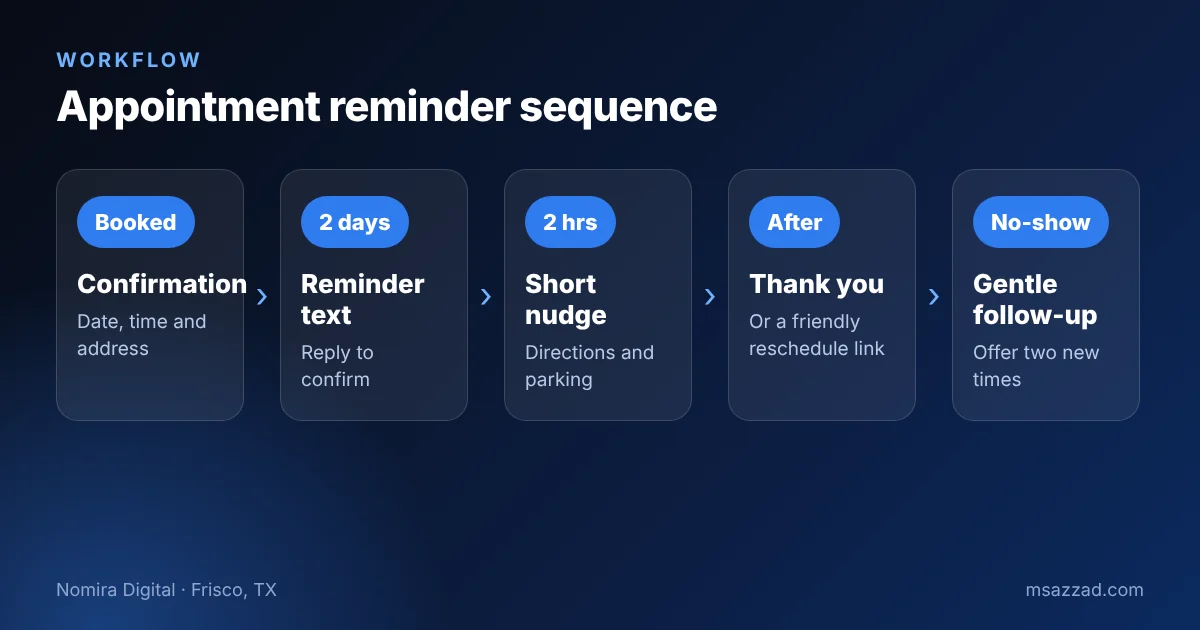
Reminders also protect your calendar for the next customer. When someone replies that they cannot make it, the system can release the slot and offer it to a waiting list, so a cancellation becomes a new booking instead of a gap. Even a simple version, where the cancellation sends you a text, helps you fill the opening the same day.
4. Review requests after the job
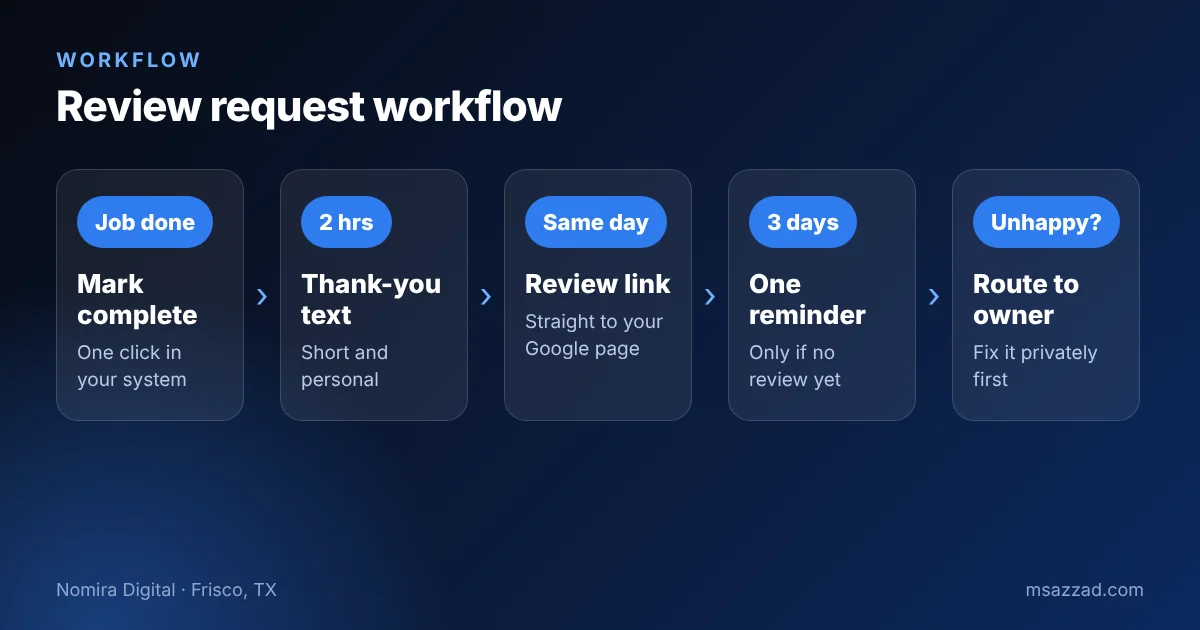
Reviews help you rank in local search and build trust with Frisco neighbors who do not know you yet. Most happy customers never leave one unless asked. After a completed job or visit, send a thank-you and a direct link to your Google review page. Send one reminder after a few days and then stop. If a customer says the experience was poor, route that reply to you privately so you can fix the problem first. Always ask for honest reviews, and never offer rewards for positive ones, because review platforms have rules against it.
5. Follow-up on quotes and estimates
A quote that sits unanswered is often not a "no". It is a "not yet". Set a reminder two days after you send an estimate, then another a week later. Keep the tone helpful: ask if they have questions, offer to adjust the scope and give a date when your schedule has an opening. Moving the lead through stages in a simple pipeline also shows you at a glance which quotes need a call today.
Here is an example of how the five fit together in a Frisco salon. A new client books online and receives a confirmation text. Two days later a reminder arrives, and she replies "C" to confirm. After the appointment she gets a thank-you with a Google review link. If she never booked and simply asked about prices, the system follows up the next day with a short message and a booking link. The owner touches none of these messages, yet the client feels well looked after at every step.
A home service company would use the same pieces with different words. An estimator sends a quote from his phone, the system schedules two follow-ups and the office sees which quotes are still open each morning. A restaurant might use only reminders and review requests. You do not need all five on day one. Choose the one that fixes the most visible problem in your business and measure whether it helps.
One more tip for estimates: record the reason when you lose a job, even in a single word such as price, timing or competitor. After a few months those notes show you where to improve your pricing, your quotes or your marketing, and they cost nothing to collect.
How to start without getting overwhelmed
Pick one workflow, build it, test it with your own phone number and run it for two weeks before adding the next. Keep every message short and human, and sign it with a real name. Check that customers can opt out of texts and that you honor requests quickly. Rules about texting and email consent apply, so confirm the details with a qualified advisor.
I set these systems up for local businesses through Nomira Digital, usually in GoHighLevel, connected to the website, forms and ads. If you want help deciding what to automate first, contact me or read about our website development in Frisco, TX, where these workflows often begin.