Ask any front desk manager in Frisco about their busiest hour and you will hear the same story: the phone rings while someone is checking in a patient, another line goes to voicemail and the caller tries the next practice on the list. An AI voice receptionist for Frisco practices is built for exactly that moment. It answers or returns the call, finds out what the person needs and gives your team a clean list to work from.
This guide covers what the technology does well, where it still needs a person and how to set it up in a way that protects your patients and your reputation.
The cost of a missed call
Every missed call is a person who wanted something now. For a practice or a service business, that person is often a new customer. They may call twice, but many will simply move on to the next result.
Research on online inquiries supports the idea that speed decides who wins. A Harvard Business Review study by James Oldroyd, Kristina McElheran and David Elkington found that most companies respond too slowly to customer inquiries. Firms that responded within an hour were far more likely to reach a decision maker than firms that waited longer. The study looked at web leads rather than phone calls, but the lesson carries over: a quick, helpful reply beats a perfect one that comes tomorrow.
What an AI voice receptionist actually does
An AI voice receptionist is a phone assistant that talks in natural speech. Depending on how you configure it, it can answer when you are busy, return calls you missed or take over after hours. It listens to the caller, replies using only the information you approved and records what happened.
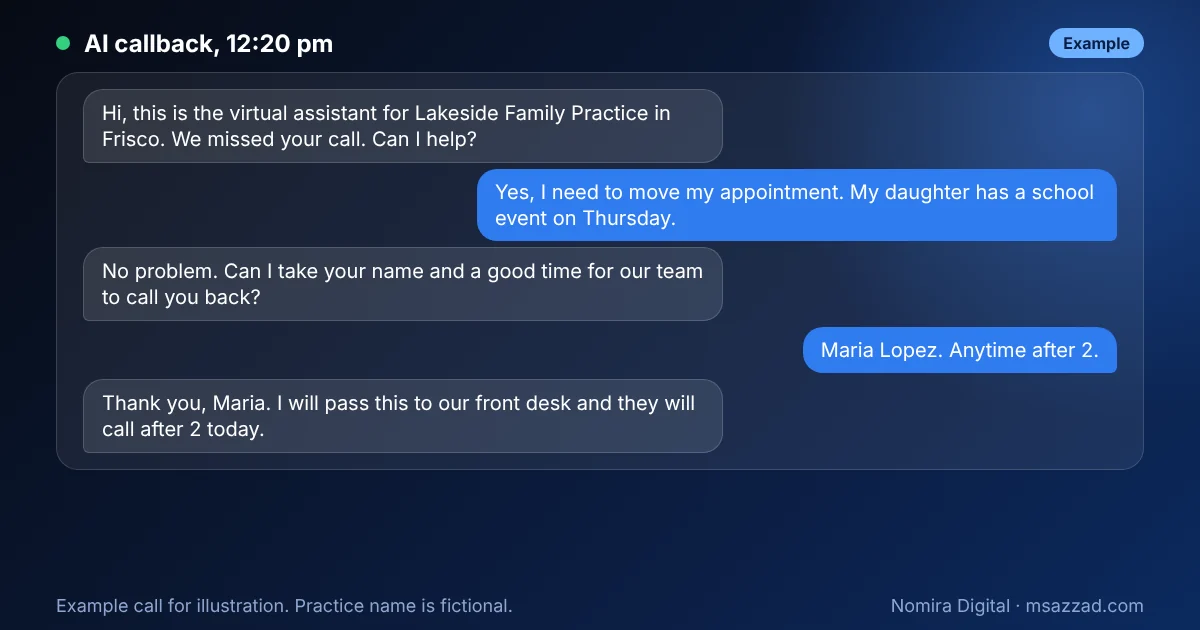
Notice what the example does not do. It does not diagnose, quote a surprise price or promise a specific appointment. It gets the caller's name, the reason and a time to call back, then hands over to a person.
How the workflow looks behind the scenes
The assistant is only one piece. The value comes from the connected steps that follow the call.
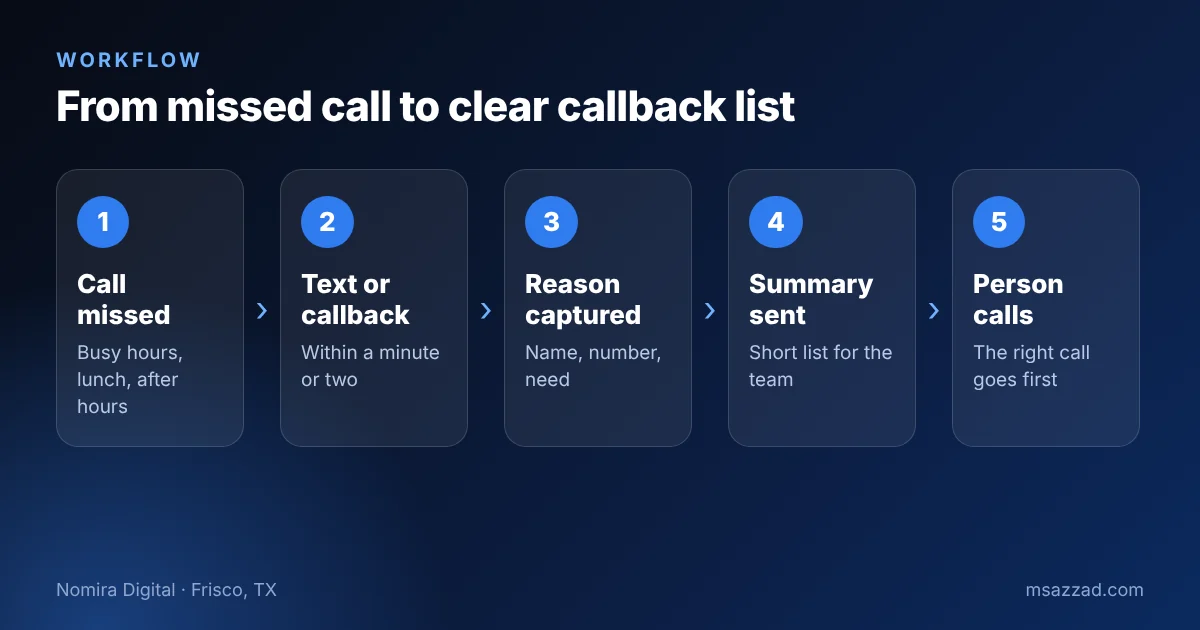
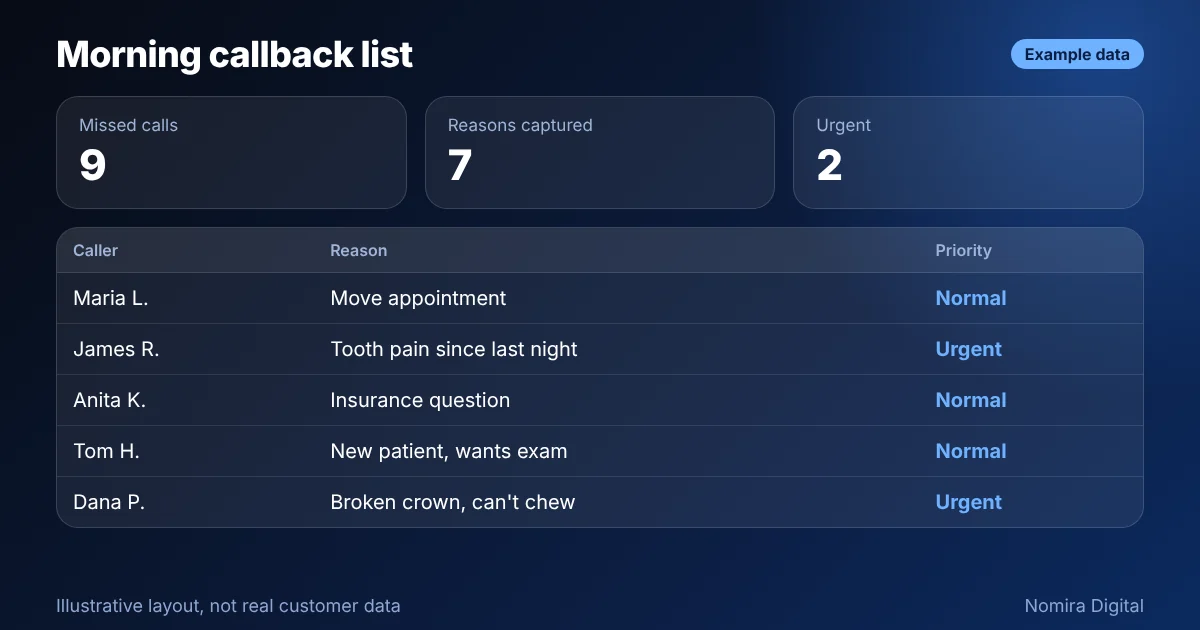
When a call is missed, the system can send a text within a minute or start an automatic callback. The assistant asks a few questions and stores the answers in your customer management tool, such as GoHighLevel. A short summary then goes to your team by text or email. Instead of a stack of voicemails, your front desk sees a prioritized list, similar to this example.
At Millennium Smiles, a dental practice I work with in Frisco, we are building and testing a callback assistant of this kind alongside the website and follow-up system, which I describe in the Frisco dental practice case study. I keep my claims modest: the technology is good at routine calls, and the practice decides the rules.
AI receptionist, answering service or voicemail?
Most practices already have some solution for missed calls, so the fair question is how an AI assistant compares. Voicemail is free and familiar, but many callers hang up rather than leave a message, and the ones who do wait hours for a reply. A human answering service picks up every call and sounds natural, yet it usually costs more per month and may not know your schedule, your services or your tone.
An AI voice receptionist sits between the two. It answers or calls back immediately, works at any hour and stores the details in your system automatically. Its weak spot is unusual situations: an angry caller, a heavy accent in a noisy room or a question it has never seen. That is why the handoff matters so much. The best setups combine all three: the assistant takes the routine calls, a person handles anything sensitive and voicemail remains as a last resort.
One more difference is data. A live service gives you a note, while an AI system can log every call, tag the reason and show patterns, such as which questions spike on Mondays or which hours you miss the most calls. Those patterns help you staff the desk better and fix confusing parts of your website.
Where it works best in DFW
- Dental and medical practices: appointment changes, new patient requests and after-hours questions.
- Home services: roofing, HVAC and plumbing calls that arrive while the crew is on a job site.
- Real estate teams: showing requests and "is this still available" calls on weekends.
- Restaurants and salons: reservation changes and simple questions during the rush.
Guardrails you need before going live
A phone assistant speaks for your business, so set it up carefully. Start with the rules below, and write them down.

Disclose that the caller is speaking with an automated assistant, follow your state and federal rules on call recording and consent, and decide how urgent calls are handled. For a healthcare practice, the safest design avoids collecting health details by phone and sends urgent cases straight to a person or to emergency guidance. This is general information, not legal advice, so ask your attorney or compliance advisor about your own situation. I discuss the healthcare side in the guide to HIPAA-safe websites and automation.
How to get started
Begin with one narrow job, such as returning missed calls during lunch and after hours. Write the ten questions callers ask most, define who gets urgent calls and test the assistant with your own team for a week before real callers hear it. Review the summaries every day at first and fix any gaps.
Measure the results in plain numbers: calls missed per week, how many were returned within ten minutes, how many became booked visits or quotes and how many callers asked for a human. If the last number is high, the assistant needs better answers or a clearer greeting. If the first number stays high, you may need more than one callback attempt or a text message option.
I build these systems through Nomira Digital for businesses in Frisco and across DFW. If you want to see what it could look like for your phones, send me a message, or read about our website development in Frisco, TX to see how calls, forms and chat can work together.