
Healthcare websites do more than they used to. They book appointments, take inquiries, send text reminders and load tracking tools for ads. Each of those features can touch private patient information. If you run a clinic, a dental office or a therapy practice in Frisco, you need a clear way to think about this before you add the next tool. This guide explains the basics of HIPAA-safe websites and automation for Frisco healthcare practices, using official HHS guidance, in plain English.
A quick note: I am a web developer, not a lawyer. This is general information, not legal advice. Your compliance officer or attorney decides what is right for your practice.
What HHS says about tracking tools
The U.S. Department of Health and Human Services (HHS) Office for Civil Rights published a bulletin on online tracking technologies in November 2022. Its current guidance page explains that practices covered by HIPAA may not use tracking technologies in ways that disclose protected health information (PHI) to vendors unless the Privacy Rule allows it.

Two details are worth knowing. First, HHS says the rules apply most clearly to authenticated pages, such as patient portals and telehealth platforms, and to pages where patients enter information, such as appointment scheduling. Second, a federal court in Texas, in American Hospital Association v. Becerra on June 20, 2024, vacated part of the guidance about IP addresses on public pages. HHS said it was still evaluating next steps, so the situation can change. Ask your advisor for the current position.
Where websites usually go wrong
Most problems are not dramatic. They come from everyday marketing tools added without a second thought:
- Ad and analytics pixels on booking, portal or form pages that can pass information about a patient's visit to an outside company.
- Contact forms that ask about symptoms, conditions or insurance details in a free text box.
- Text and email automation that includes the reason for a visit in the message.
- Chatbots and call tools from vendors that will not sign a business associate agreement (BAA) when one is needed.
HHS also notes that a privacy policy or cookie banner does not replace the authorizations HIPAA may require, and that a vendor's promise to delete data afterward may not be enough. That is why it is better to avoid collecting sensitive details than to rely on cleanup.
Safer setups, side by side

The pattern is simple: collect the minimum, say less in automated messages and keep clinical details inside systems built for them.
Forms and follow-up that respect privacy
A contact form for a new patient needs only a name, a phone number or email and a good time to reach them. Leave the reason for the visit as a short dropdown such as "New patient exam" or "Question about services", not a free text box that invites medical details. Add a short line under the form that says not to include health information.
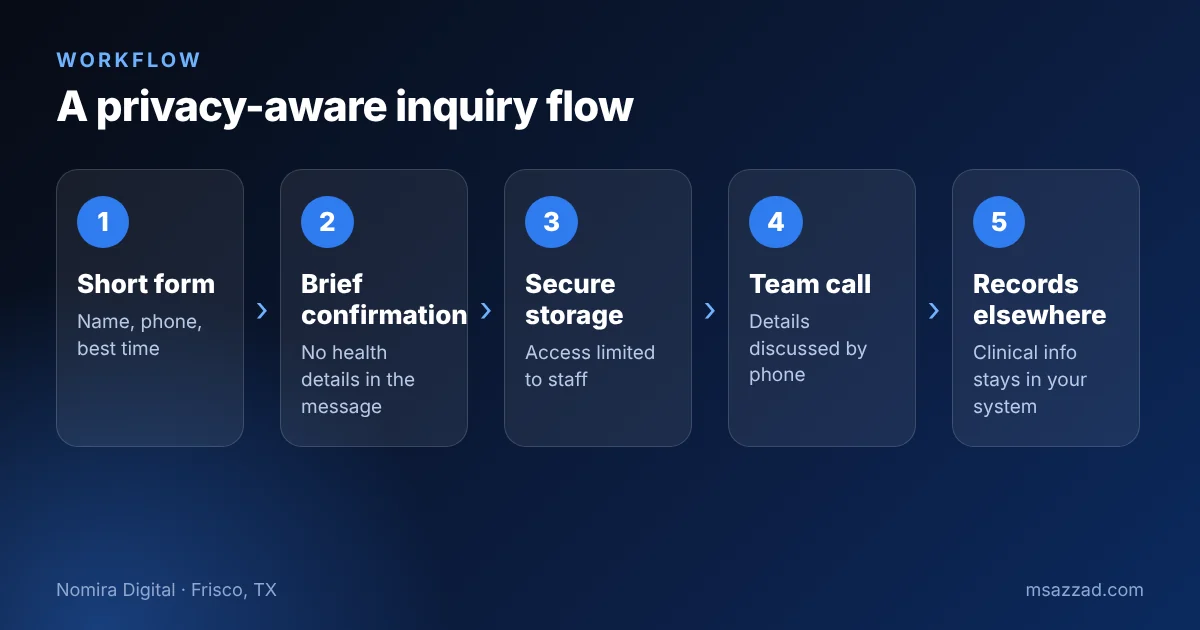
Automated confirmations should read like a restaurant reservation: "Thanks, Maria. We received your request and will call you today." They should not say "We received your request about your root canal." Detailed conversations belong on the phone or in your practice management software, not in text messages or marketing tools.
Chatbots, call assistants and tracking
AI chat and voice tools can help a healthcare practice, but they need stricter rules. Tell users they are talking to an automated assistant. Block the assistant from asking for symptoms, medical history or insurance numbers. Send urgent situations to a person or to 911 guidance. Ask each vendor where the data is stored, who can access it and whether they will sign a BAA if the tool may handle PHI. I describe safe uses in the guides to AI chatbots for Frisco businesses and the AI voice receptionist for Frisco practices.
For analytics and advertising, work with your advisor to decide which pages can carry tracking tools and which cannot. Booking pages and portal login pages deserve the most caution. You can often measure what you need with tools that do not send identifiable details to ad platforms.
Questions to ask every vendor
Before you connect a new form builder, chatbot, text service or analytics tool, ask four plain questions and write down the answers. Will you sign a business associate agreement if the tool could handle patient information? Where is the data stored, and for how long? Who at your company can see it, including support staff and AI training systems? Can I export and delete everything if I stop using the service?
A good vendor answers quickly and clearly. A vague answer, or a refusal to sign an agreement when one is needed, is your signal to keep that tool away from patient details. It is also a good moment to check the free versions of popular tools. Free plans often do not offer agreements, which can make them unsuitable for anything that touches patients.
Finally, keep an inventory. A one-page list of every tool on your website, with its purpose, owner and renewal date, saves hours during a review. Many practices discover tools that a past marketer installed and nobody remembers. Removing an unused pixel is the cheapest privacy improvement you can make, and it also makes your site load faster for patients in Frisco and across DFW.
A starter checklist
Use this list to prepare for a conversation with your compliance advisor. It is not a complete compliance program.
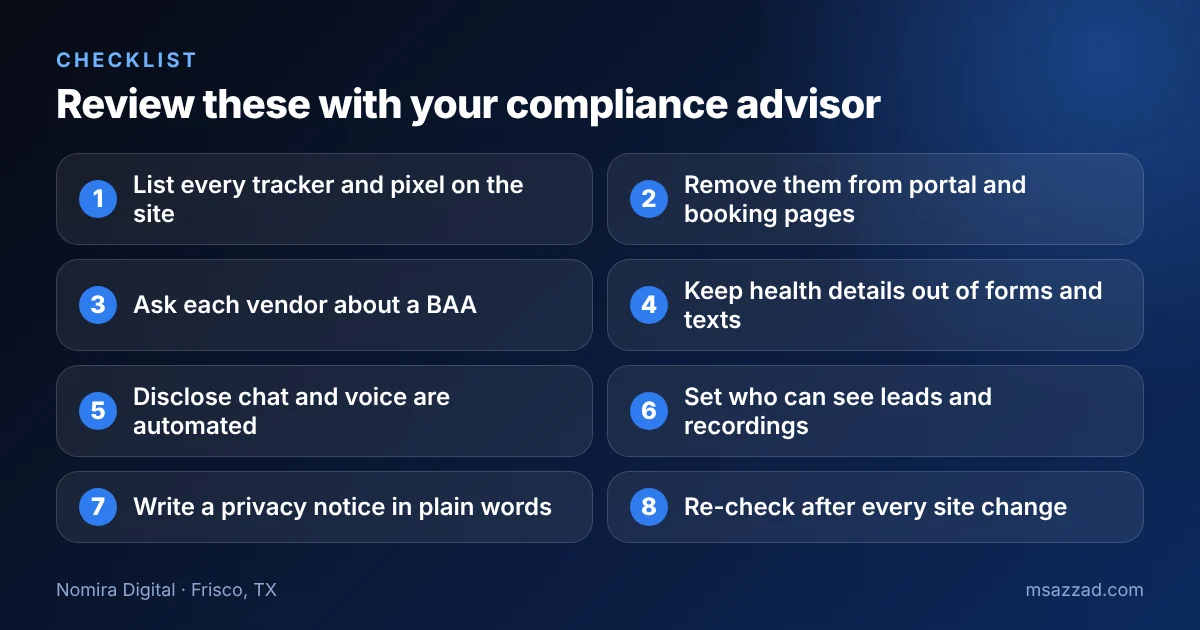
Put a date on each item and repeat the review whenever you change the site, add a tool or switch vendors. Document what you decided and why, because good records show good faith and make the next review much faster.
If you would like help putting this into practice, here is how I work. At Nomira Digital I build websites and automation for healthcare and dental practices, including a Frisco dental practice I work with. I design with privacy in mind, keep forms short, limit trackers and flag vendors that need agreements. I do not give legal advice and I work alongside your compliance advisor. If you want a second look at your current site, see our dentist website service in Frisco, TX or contact me.